

Centreon + Astry: turn your monitoring alerts into handled incidents
Centreon is one of the most widely used monitoring platforms in IT departments. It excels at detecting: a server that stops responding, a disk nearly full, a web service returning errors. But a detected alert is not yet a handled alert. It still has to wake up the right person, at the right time, and you still need to know what was done about it.
That is exactly Astry's job. And that is why we are launching today a native integration with Centreon: problems detected by Centreon automatically open incidents on Astry.
The problem: notifications that get lost
In many organizations, Centreon notifications are sent by email to a mailing list. During business hours, it more or less works. At night and on weekends, much less so:
- nobody reads their email at 3 a.m.;
- when everyone receives the alert, nobody feels responsible for handling it;
- a recurring alert generates dozens of messages, which end up being ignored;
- there is no record of who took ownership of the problem, or when.
What the integration changes
As soon as Centreon reports a problem on a host or a service, Astry:
- opens an incident, titled with the affected service and host, and described with the output of the Centreon check;
- assigns it a priority based on the reported state: by default, a
CRITICALservice or aDOWNhost is priority 1, aWARNINGpriority 3. These mappings can be changed by the organization's Owners; - triggers alerting: the on-call person is notified according to your schedules (push notification, SMS, phone call), with escalation if nobody acknowledges;
- groups repeats: if Centreon sends another notification for a host or service that already has an open incident, it is added to that incident's alerts instead of creating a new one.
From then on, the team handles it like any other Astry incident: acknowledgement, comments, reassignment, resolution, and a complete timeline for the post-mortem.
A deliberate choice: recoveries (RECOVERY) do not close the incident. A service that turns green again on its own often deserves an explanation of why it went down. So it is your team that decides when the incident is resolved.
Set up in a few minutes
The integration requires no module to install on your Centreon server. It relies on a standard Centreon mechanism, notification commands:
- an Owner enables the integration in Astry (Organization > Incoming Integrations > Centreon) and generates a key;
- in Centreon, you create two notification commands (one for hosts, one for services), ready to copy and paste from the integration page;
- you create an "Astry" contact that uses these commands, and link it to the hosts and services that should raise incidents;
- you export the Centreon configuration.
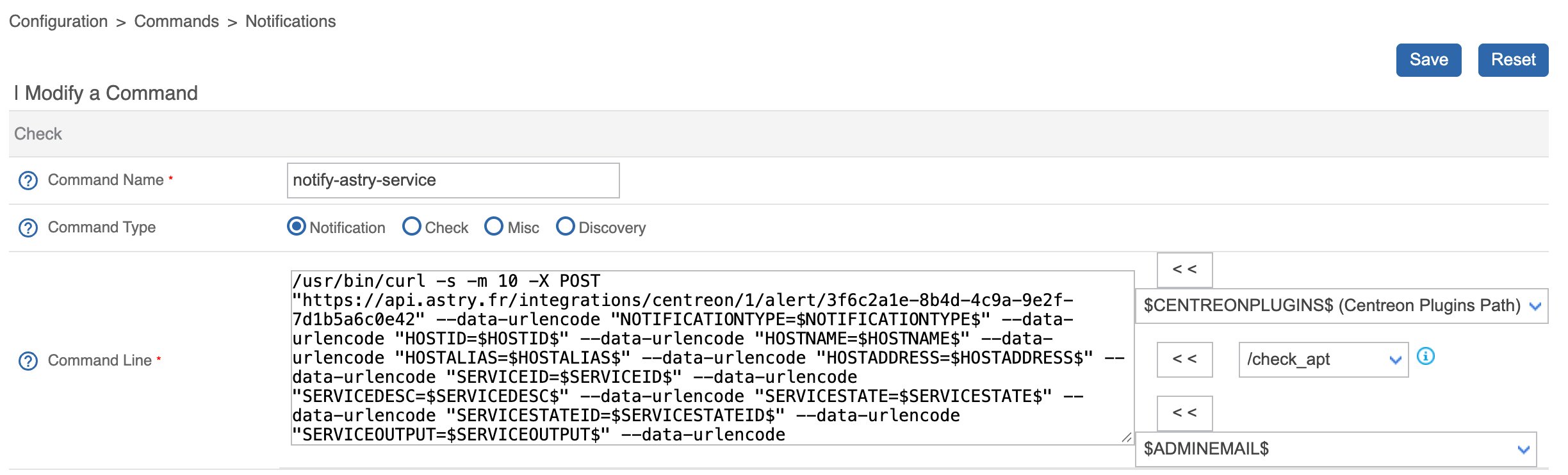
To validate everything, the documentation suggests creating a test host pointing to an address that never answers: one or two minutes later, Centreon detects it as DOWN, and the matching incident opens on Astry.

Security and network
- No inbound traffic to your infrastructure: Centreon sends its notifications to Astry. Only outbound HTTPS to
api.astry.fris required from the servers sending notifications (the central server and, if applicable, pollers). - Revocable keys: each integration can have up to 5 keys, so you can rotate them without any service interruption.
- You choose what gets through: only the hosts and services linked to the Astry contact, and only the states you checked, open incidents.
Going further
Centreon joins Astry's list of incoming integrations, alongside Prometheus, Zabbix and Nagios among others, as well as the built-in HTTP probes. Whatever tool detects the problem, the response is the same: the right person is notified, and everything is tracked.
The complete step-by-step guide (with screenshots) is available in the Centreon integration documentation. Using Centreon and want help with the setup? Contact us.